
What Are AI Agents? And Why Every Leader Should Be Paying Attention
By Alane Boyd, Co-CEO, Biggest Goal
When ChatGPT first hit the scene, many of us got excited (and overwhelmed). It promised so much: instant answers, faster workflows, smarter automation. But the leap from chatting with AI to having AI act like a team member wasn’t immediately available.
That leap? It’s what we now call AI agents—and they’re about to change how we work forever.
When I first started hearing about AI agents, I’ll be honest—I was confused. I had a hard time understanding what they were and how they differed from how we were already using AI.
And that’s saying something, because I’ve been in the tech world for years. I remember thinking, “Isn’t this just a fancy way to say you’re using OpenAI in a workflow?” It wasn’t until we started building AI agents for our own business and for our clients that it finally clicked, and it blew my mind!
In this article, I explain the difference between ChatGPT, automated-AI workflows, and AI agents. I’ll share what an AI agent is, and examples of what they can do. I hope this inspires you to use AI agents in your department or across your company!
Next came AI integrated into workflows through. Think of it like an automated step in a sequence: AI reads the input and spits out an output. Useful, definitely– but still part of a linear process. It didn’t leave much room for nuance or decision-making.
Now, AI agents go a step further. They’re not just passive processors—they’re active participants in your workflows. Agents can interpret intent, reason through complex requests, search across your systems, and return actionable insights. They mimic how a human teammate would work—without needing you to write a thousand lines of code.
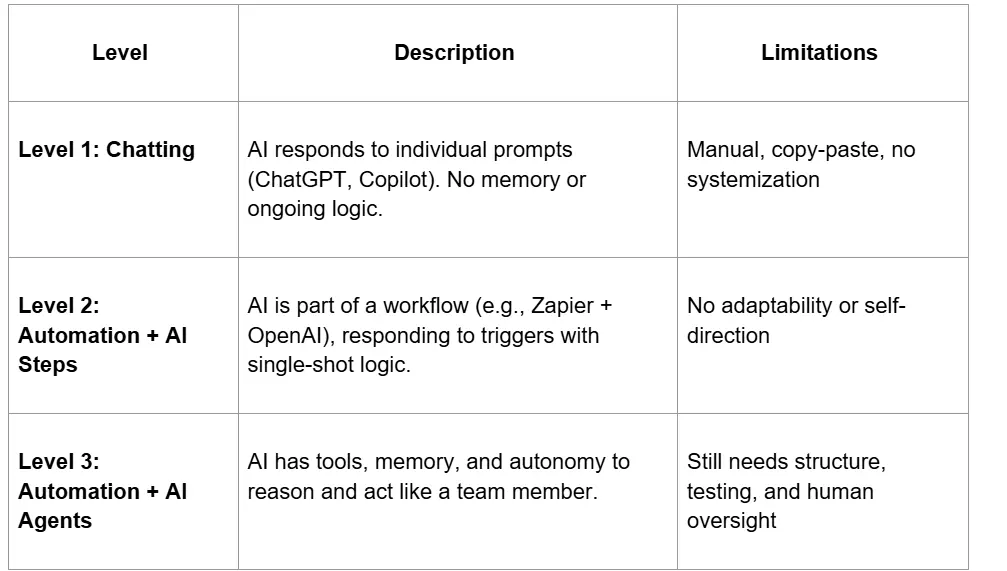
AI agents represent Level 3—where the real innovation happens. These three levels of AI are not mutually exclusive. On any given day, I use all three.
Imagine having AI agents triage support emails, create and assign tasks, and even draft your responses.
For IT teams, this unlocks serious potential. Here’s what we’ve built recently using AI agents:
- Automated document search: Need to know what policy access that employee has? Ask the agent. It searches your SharePoint or Google Drive, finds the correct doc and gives you a summary
- Monitoring system alerts: Instead of manually checking an email inbox for error notifications, our AI agent watches it 24/7. When something’s wrong, it opens the project management software, finds the right client, checks for duplicate tasks, and either comments or creates a new task—all without human intervention.
- Time and budget tracking: The AI agent pulls daily time logs, flags overages, and alerts project managers in Slack. It even compares this month to last, helping leadership decide if it’s time to hire based on real data.
They’re reactive. You still have to do most of the heavy lifting by writing the prompt and supplying the context.
An AI agent, on the other hand, is proactive. Think of it like a digital teammate—not just giving advice, but also taking action.
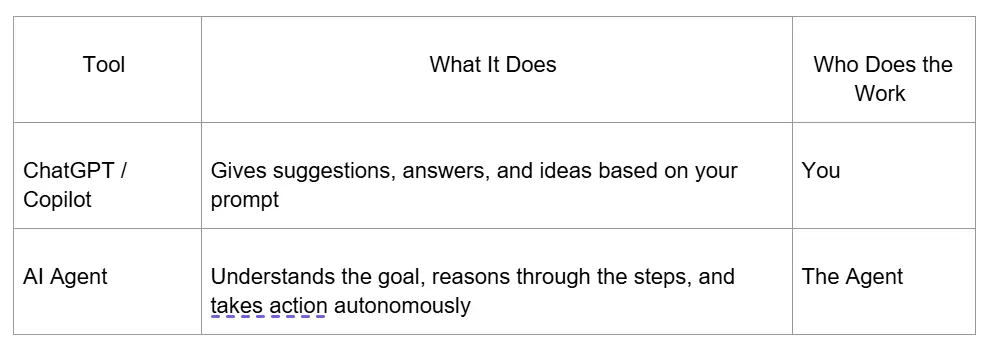
- With ChatGPT/Copilot: You might paste in an email and ask, “What does this error mean?” It’ll help you interpret it—but you still have to open your tools, log the issue, and alert your team.
- With an AI Agent: It monitors the inbox 24/7, parses the error, identifies which client it relates to, checks if the issue is already being tracked in your project management tool, and if not—creates a ticket, assigns it, and even pings the right person in chat.
- ChatGPT: You could upload a doc and ask it to summarize or find a detail—but you have to locate the document first
- AI Agent: It finds the right file for you in SharePoint, opens it, finds the relevant section, summarizes the answer, and returns it—all from a simple request like, “What’s the SSO policy for Acme Corp?”
TL;DR:
- ChatGPT = “Here’s what you should do.”
- AI Agent = “Let me go do that for you.”
A concern I often hear is that they are replacing humans. They’re not replacing humans. They’re allowing us to operate at a higher level, where we can be strategic and creative.
They allow us to move faster without sacrificing quality, support our teams with better insights, and automate the tedious work so we can focus on the work we enjoy.
If your files are chaos, your agent’s output will be chaos. Just like a new hire, an AI agent needs structure to succeed. Clear file names, consistent foldering, and basic process flows will go a long way.
And while some platforms offer “prebuilt agents,” don’t be fooled—those are templates. The magic happens when you customize workflows to your systems, your team, and your goals. That’s where optimization (and results) really take off.
- Clear system structure (naming conventions, folders, file types)
- Efficient context (too much data = unpredictable output)
- Defined roles (each agent should have one job)
- Testing and iteration (agents aren’t plug-and-play magic)
And most importantly, you need humans in the loop—not just to supervise, but to lead creatively, set goals, and make judgment calls.
And the companies leading the charge? They’re letting their teams do more, in less time, with fewer errors and it is up to us to lead those conversations and not wait for someone else to suggest change.
Let’s not wait to be disrupted. Let’s lead the disruption!
WOTC West 2025 is the place for women in the IT channel to connect, master leadership, and leave inspired as we shake things up in tech.
I hope to see you there!
Bio: Alane Boyd is the Co-CEO of Biggest Goal (formerly Workday Ninja) and co-host of the Automate Your Agency podcast. Alane is a serial entrepreneur and workflow automation expert, she has built and exited two SaaS companies. She specializes in developing AI-powered tools that solve industry-specific challenges while helping businesses streamline workflows, boost efficiency, and scale smarter through cutting-edge, AI-driven solutions.